Qelmar AI · reads your week from the numbers

The system that turns
goals into results.

Every area of life in one place — goals, projects, habits, finances. AI sees the whole picture and moves you forward.

10 AI recommendations a month · No credit card. Sign up in 40 seconds.
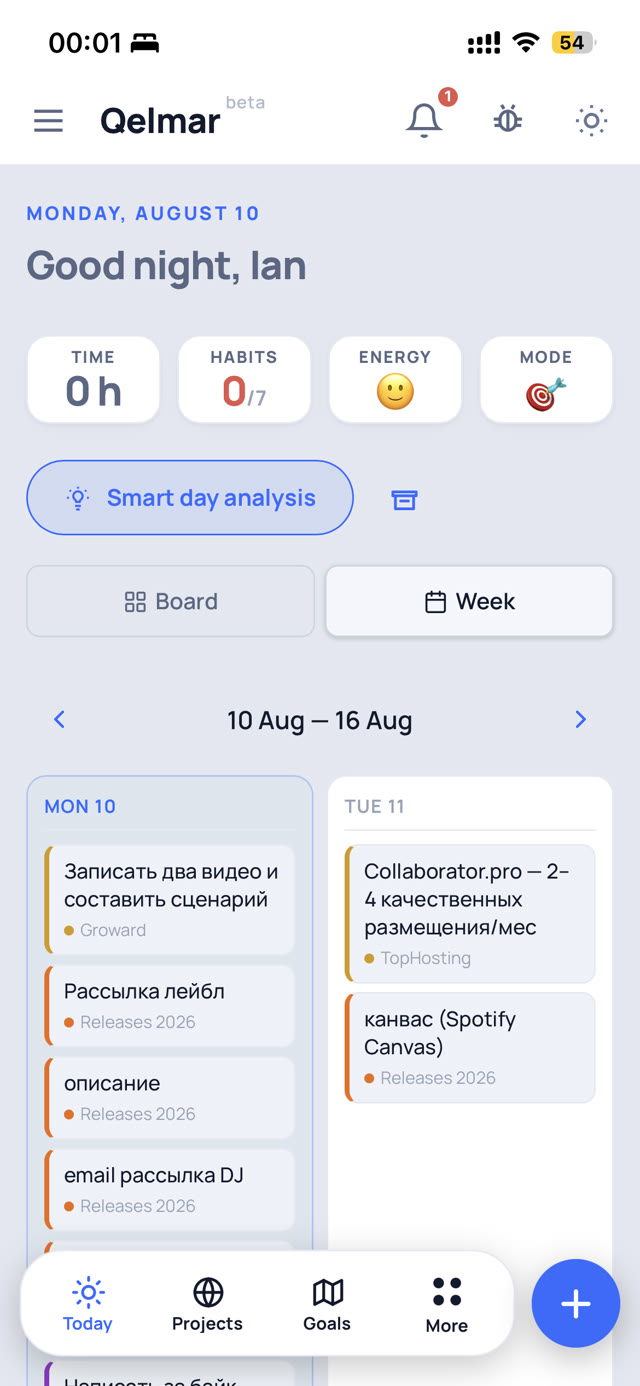
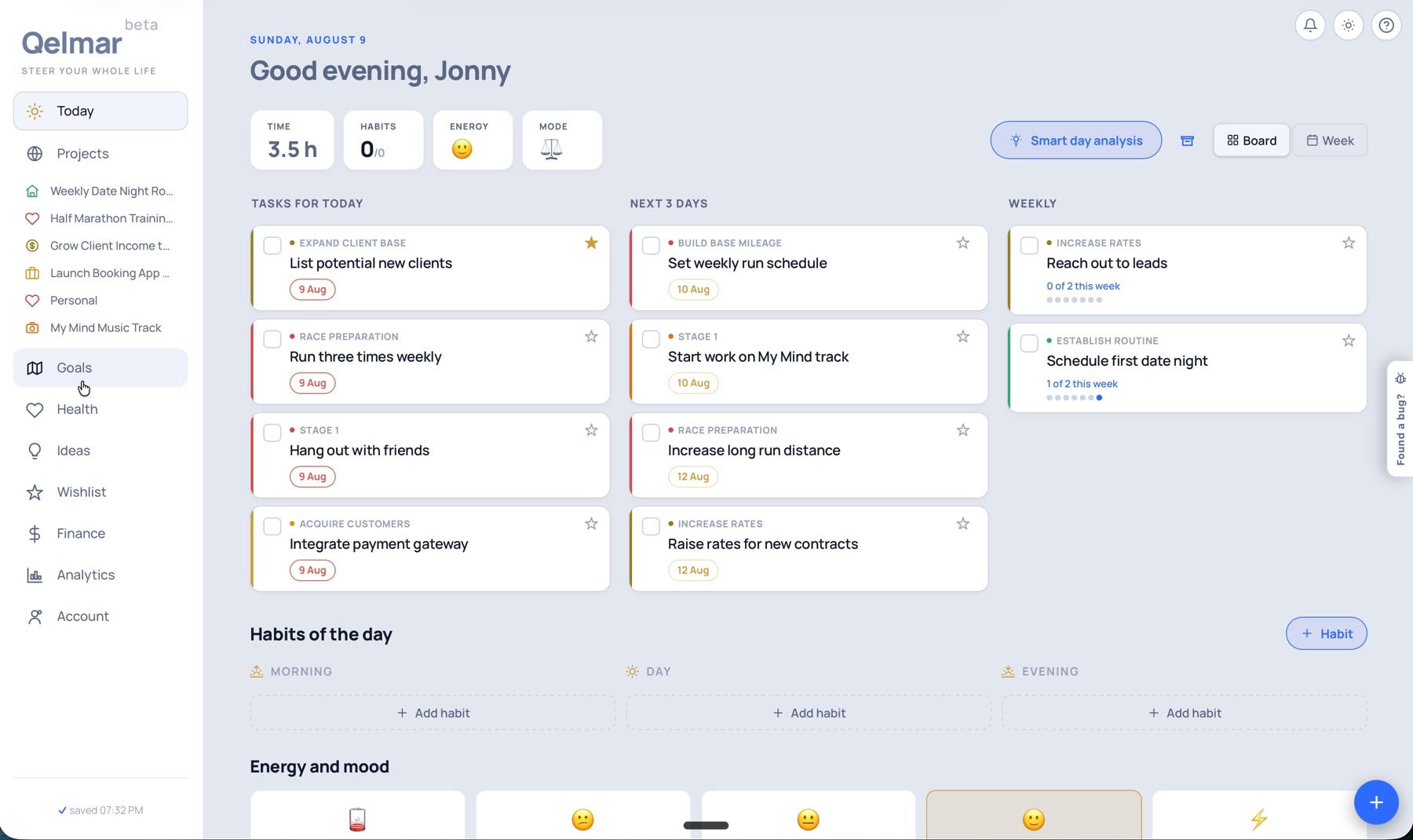
Qelmar — Today screen: tasks, habits, energy and day mode
Qelmar on the phone
One chain

One chain runs
through all of it.

Spheres hold goals, goals hold projects, projects hold tasks. The weekly review reads the whole chain at once. Built for people running several ventures who would rather not pay for it with their sleep, their family and what is left of their energy.

Life spheres
Year goals
Projects
Tasks
Weekly review
8 life spheresYear goals with KPIsWeekly AI reviewVoice captureHabits & energyFinances per projectAdvanced analyticsInstall to your phone10 AI recommendations a month free8 life spheresYear goals with KPIsWeekly AI reviewVoice captureHabits & energyFinances per projectAdvanced analyticsInstall to your phone10 AI recommendations a month free
The problem

Being busy is not the same as moving.

Busy, not moving

241 tasks closed last month. Not one goal moved. The list was full; the year wasn’t.

Nothing to show for it

102 hours went into a project that earned nothing. You found out six months later.

Burnout doesn’t announce itself

Energy, relationships and rest never make the list. By the time you notice, it isn’t a busy month — it’s burnout.

How it works

Three steps. Two minutes to start.

Voice input

Dump everything in one voice message — what you’re building, what’s due, what you keep forgetting.

Qelmar splits it into goals, projects, tasks, ideas and purchases. When something is unclear, it asks instead of guessing.

The whole picture

Spheres of life, year goals with KPIs, projects broken into stages. Plus habits, energy and income per project.

One structure, three horizons: today, this week, this year.

The honest review

Every Monday Qelmar reads your week against your goals: where the hours went, what stalled, what to move, what to drop.

Recommendations, and the blind spots you would miss on your own.

Two minutes — and you have a plan for your life.

No card, no trial countdown — 10 AI recommendations a month, free while we’re in early access.

Start free
The assistant

Run the whole system by voice.

Tasks, goals, projects, deadlines, things you want to buy someday. You say it out loud, it lands where it belongs.

Voice message · 0:42
“Launching the course by October — need a landing page, three emails and a pricing test. Morning workout every day. And push the client demo to Friday…”
Add anything…
AI analysis
Added:
Goal created“Course launch” · year goal
Project added3 stages: landing, emails, pricing
5 tasks createddeadlines over 3 weeks
Habit addedmorning workout · daily
Deadline movedclient demo → Friday

Unsure about something? It asks — with buttons, not a form.

AI analysis

Shows the blind spots you cannot see from the inside.

The review takes your whole track record and the context across every sphere at once — your day, projects, year goals, finances, energy.

AI is optimizing your day…
Reading today’s load and deadlines…
1 of 5 sections
Qelmar is analyzing — a few seconds…
Cancel
  • Your dayWhat to do first, what to move, what won’t fit — against deadlines, energy and the load of the next three days.
    read
  • Your projectsWeekly deep review: hours, revenue and KPI side by side — what stalled and what to drop.
    read
  • Your goalsWhether year goals actually move — and which projects quietly stopped serving them.
    read
  • Your energyHabits, supplements and how they show up in the way you feel — with recommendations that read them.
    read
  • All of it at onceThe AI review reads every section in one pass — balance, risks, priorities.
    read
The system

Ten sections, one living system.

The sections see each other: whatever you add by voice or by hand lands where the review can see it.

Projects
  • Stages, statuses and priorities in one view
  • Every project carries a KPI — one key performance indicator
  • Hours spent sit right next to progress on that indicator
  • See what moves and what quietly stalls
Goals & KPIs
  • Year goals with measurable targets
  • Checkpoints spread across the timeline
  • Off-track warnings before it is too late
Life spheres
  • Eight areas of life, from energy to finances
  • Add and rename areas to match your life
  • Everything you create lives in one of them
Time tracking
  • Hours land as you close tasks
  • They roll up to stages and projects
  • Facts only — no planning theater
Advanced analytics
  • Life balance wheel: self-rating against real activity
  • Momentum, where the energy goes, KPI dynamics
  • The AI review reads all of it in one pass
Habits and supplements
  • Habits by cycle: morning, day, evening
  • Supplements and courses — what you take and when
  • AI recommendations that read them
Energy and rhythm
  • Energy patterns next to your daily cycles
  • Energy level and day mode every day
  • The review takes them into account when it suggests a plan
Ideas
  • Capture by voice in a second
  • AI turns the good ones into tasks when you say so
  • Nothing gets lost in chats and notes
Wishlist
  • Purchases and dreams, apart from tasks on purpose
  • No deadlines, no guilt
  • Turns into a project when the time comes
Finances
  • Income and spending per project
  • Right next to the hours spent
  • See which venture pays for itself
Compare

Calendar tools plan your day. Qelmar sets your goals and walks you to them.

AI calendarsTask trackersQelmar
Coreslots in a calendarlists and boardsspheres → goals → projects → tasks
Horizontoday to this weektodayday, week, year
What the AI doesmoves events aroundsuggests wordingturns speech into structure, then reviews the result
Success metricthe day is scheduledtasks are closedgoals move, balance holds
Finances××income per project, next to hours spent
Energy & personal×manualhabits, energy, day mode
Weekly review

This is what lands in your inbox every Monday.

A read on where the week actually took you, with the numbers behind it.

Qelmar · Weekly project review · Mon 8:00

State of the week

31 h logged across 4 projects. Two goals moved, one stalled.

Findings

Client work ate the year goal. 19 of 31 hours went to a project with no KPI attached — the launch slipped again.
Your habit streak broke on Thursday. Energy has been “low” 3 evenings in a row; the review moved two deep-work blocks to mornings.

Do this week

Set a KPI for “Client pipeline” — it has 19 h and no targetApply
Move “Record demo” to Tue morning — highest-energy slotApply
Pause “Side blog” — 6 h/week, $0, no goal attachedApply

That’s the actual format: state, findings, and actions you apply with one tap.

Pricing

Start free. Pay when you outgrow it.

Free $0forever
  • 5 projects with stages and tasks
  • 10 AI requests a month
  • Every section: spheres, year goals, habits, energy, finances per project
  • Weekly review in your inbox
  • Install to your phone, capture by voice
Create free account
Pro $9a month
  • Unlimited projects and stages
  • 50 AI requests a month
  • Every section: spheres, year goals, habits, energy, finances per project
  • Weekly review in your inbox
  • Install to your phone, capture by voice
  • Priority support by email
Start free

While early access lasts, Pro is optional: the free plan is enough to run the whole system.

One AI answer — one request
Day review Project review Smart goal analysis Analytics review Recommendations Weekly report by email Reading back what you said out loud

Speech transcription is free and doesn’t count. When your requests run out, the system keeps working: structure, tasks, habits, hours and finances all stay in place.

FAQ

Questions, answered straight.

Is this another to-do app?

No. A to-do app answers “what’s next”. Qelmar answers “is this taking me where I said I wanted to go” — and shows the numbers behind the answer.

Do I have to set everything up first?

No. Say one sentence about what you’re working on. The onboarding builds your first structure in about two minutes, and you correct it as you go.

What happens after the 10 AI recommendations?

Everything keeps working — your structure, tasks, habits and the reports you already have. Only new AI recommendations wait for the next month.

Does it work on a phone?

Yes. Install it from the browser and it behaves like an app, including voice capture and notifications.

Is my data private?

Only you can see your records. We don’t sell them and we don’t hand them to advertisers, and access to other people’s data is blocked at the database level, not just in the interface.

What exactly does the AI see?

Only the fragment a particular request needs: for the day review — today’s tasks and energy; for the project review — hours and KPIs per project. Not the whole dashboard and not the archive. Your records are not given to model training, and the providers are listed in the privacy policy.

Can I take my data with me?

Yes, any time. Export everything as a single file straight from the app — no support tickets and no waiting. If you decide to leave for good, the delete-account button is right there, and your records go with it.

What if I stop opening the app?

The weekly review still lands in your inbox on Monday: it assembles itself and does not need you to open anything. Usually it is that letter that brings people back — it shows what moved over the week and what stalled.

What is this going to cost?

The free plan stays free: 5 projects and 10 AI requests a month. Pro is $9 a month — unlimited projects and 50 requests. We do not ask for a card at signup.
Your data

Your data stays yours.

Goals, finances, energy, plans — a lot ends up here. So we answer specifically, not in general words.

AI sees a fragment, not your whole life Only the text a particular request needs goes to the model. Not the whole dashboard, not a year of archive.
We do not give your data to model training Your records are not used for training. Providers are named one by one in the privacy policy.
Take it with you at any moment Export everything as a single file, straight from the app. No support tickets and no waiting.
Leaving takes one click The delete-account button sits right there in settings. Press it and your records leave with it — nobody talks you out of it.
Nobody sees what is not theirs Nobody but you sees your records — that is locked in the database itself, not merely hidden in the interface.
Ads do not live here We make money on subscriptions. There is nothing to sell advertisers and no reason to.

Time to start reaching
the goals you set.

Runs in the browser, installs to your phone. No card, no trial countdown.